> For the complete documentation index, see [llms.txt](https://ems.help.dotb.vn/llms.txt). Markdown versions of documentation pages are available by appending `.md` to page URLs; this page is available as [Markdown](https://ems.help.dotb.vn/dotb-ems/ticket-support.md).
# TICKET SUPPORT
Tính năng hỗ trợ EMS giúp người dùng thống kê và xem lại lịch sử, danh sách issue xử lí bởi đội ngũ kĩ thuật, tư vấn DOTB. Có thể thuận tiện trong việc xem lại câu hỏi, tính năng chưa nắm bắt kịp thời
### Bước 1: Truy cập EMS Support
Vào tính năng **EMS Support** (Hỗ trợ EMS), chọn **tạo mới hoặc click chọn Ticket Support** như hình bên dưới**.**
### Bước 2: Tạo mới phiếu hỗ trợ
Tại màn hình tạo issue hỗ trợ, người dùng nhập thông tin cần hỗ trợ. Cuối cùng bấm **Save**(**Lưu)**.
{% hint style="info" %}
**Ghi chú** :
1. Tên issue cần hổ trợ xử lí
2. Loại issue cần gửi
3. Nội dung issue cần hổ trợ xử lí
4. File, hình ảnh đính kèm
5. Issue cần thông báo thêm cho người nào phụ trách nắm thông tin
{% endhint %}
### Bước 3: Chat với chuyên viên tư vấn
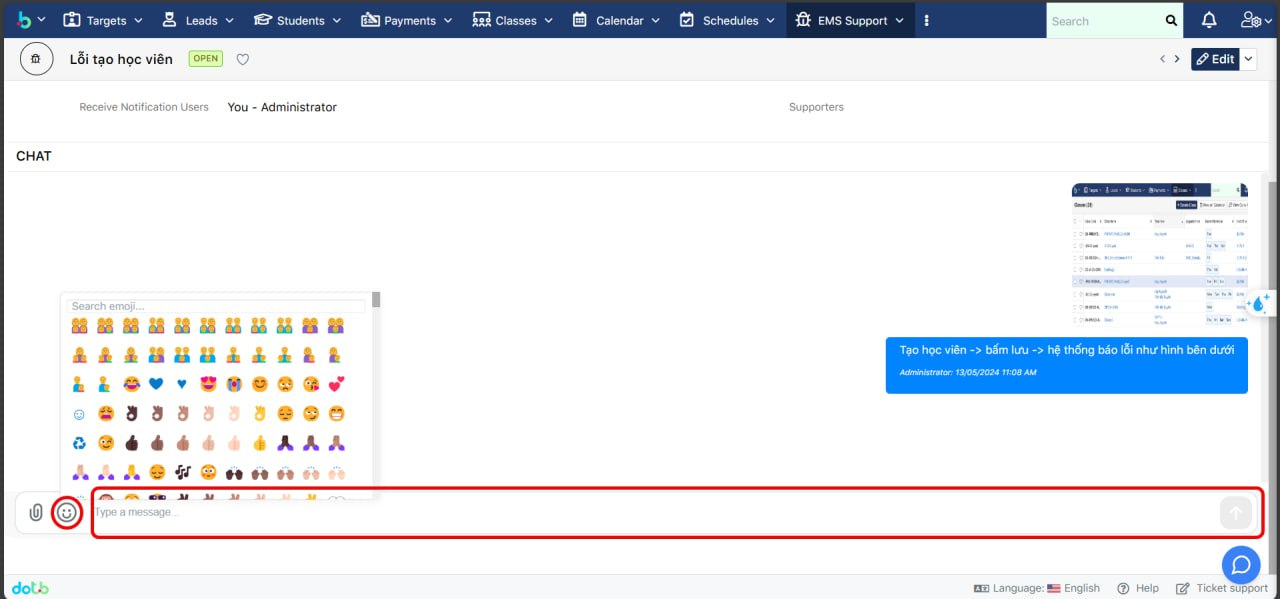
Sau khi lưu thành công, trường hợp cần bổ sung người dùng có thể nhắn vào ô **Chat** bên dưới của issue đó.
**Ghi chú:** Người dùng có thể thả icon, đính kèm thêm file, hình ảnh trong đoạn chat