> For the complete documentation index, see [llms.txt](https://ems.help.dotb.vn/llms.txt). Markdown versions of documentation pages are available by appending `.md` to page URLs; this page is available as [Markdown](https://ems.help.dotb.vn/cach-thuc-tim-kiem-du-lieu.md).
# Cách thức tìm kiếm dữ liệu
Đây là bước cơ bản để người dùng có thể lọc và tìm được thông tin dữ liệu trên hệ thống
## Tìm kiếm học viên theo từ khóa
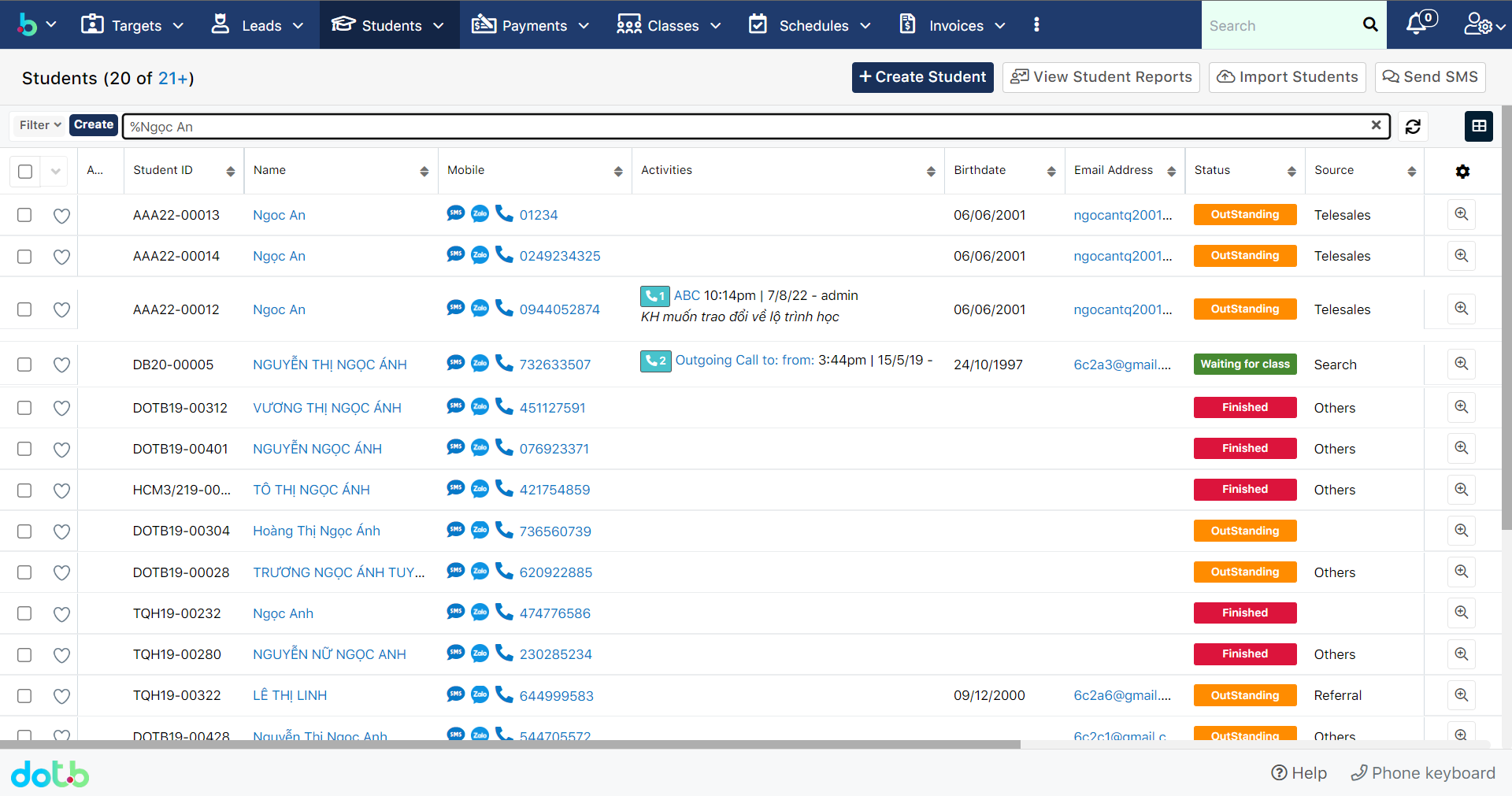
> Khi tìm kiếm theo từ khóa, người dùng lưu ý phải luôn có dấu ***%*** phía trước kí tự cần search.
{% hint style="info" %}
:woman\_gesturing\_ok: **Ghi chú:**
Tìm kiếm câu hỏi trong module học viên. Ví dụ muốn tìm bài viết có tên là "Ngọc An" thì bạn search "%Ngọc An" hoặc có thể nhập cả tên của học viên.
{% endhint %}
## Tìm kiếm học viên theo tiêu chí Bộ lọc
> **Bước 1:** Ở màn hình danh sách, ví dụ module Học viên - Student, tại **Bộ lọc - Filter** ta nhấn vào button **Tạo mới** - **Create,** để bắt đầu tạo cửa sổ lọc.
> **Bước 2:** Nhập đầy đủ thông tin cần thiết, điều kiện cần lọc
>
> * Tiếp theo tùy theo việc bạn muốn tìm kiếm thông tin như thế nào, thì bạn sẽ nhấn chọn những trường phù hợp, ví dụ chúng tôi muốn lọc theo Trạng thái - **Status** và Người phụ trách - **Assigned** **to** của học viên.
> * Với công cụ lọc: **Is any of, Is not any of, Is empty, Is not empty**.
{% hint style="info" %}
:woman\_gesturing\_ok: **Ghi chú**
* Is any of: Bất kì
* Is not any of /Không phải là : Không bất kì
* Is empty: là Trống
* Is not empty: Không trống
{% endhint %}
> **Bước 3:** Hệ thống sẽ load theo danh sách học viên thỏa mãn tiêu chí mà người dùng đã chọn, ví dụ chúng tôi lọc học viên theo Status là **"Học nợ - Outstanding"** và Assign to là **"demo".** Sau đó có thể đặt tên bộ lọc và lưu lại.